After driver update…
 
Powiadomienia
Wyczyść wszystko

After driver update to 5.5.30, Shutter moves partially to open, then closes


(@bill110366)
Trusted Member
Połączone: 2 lata temu
Wpisy: 38
Rozpoczynający temat  

Hello,


I sent an Support ticket, but no answer so far.

Driver updated to 5.5.30 (reinstalled twice)

All functions ok, except Shutter opening: The shutter moves about 15 to 30 degrées, and then closes again.

Weather station: No difference by selecting either AAG SOLO, AAG CLOUDWATCHER, SCOPE DOME CLOUDSENSOR or NONE 

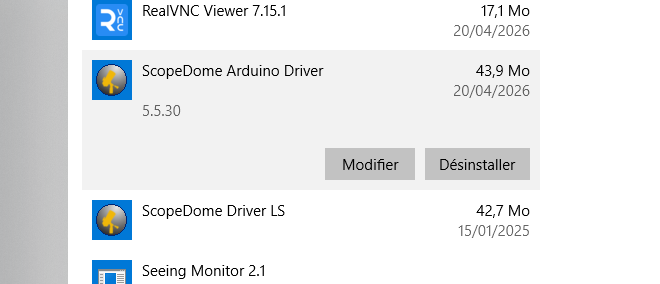
A point of interrest: in the „About” Windows, the Driver seams still to be 5.5.27. Is this normal?

Capture.PNG dome version
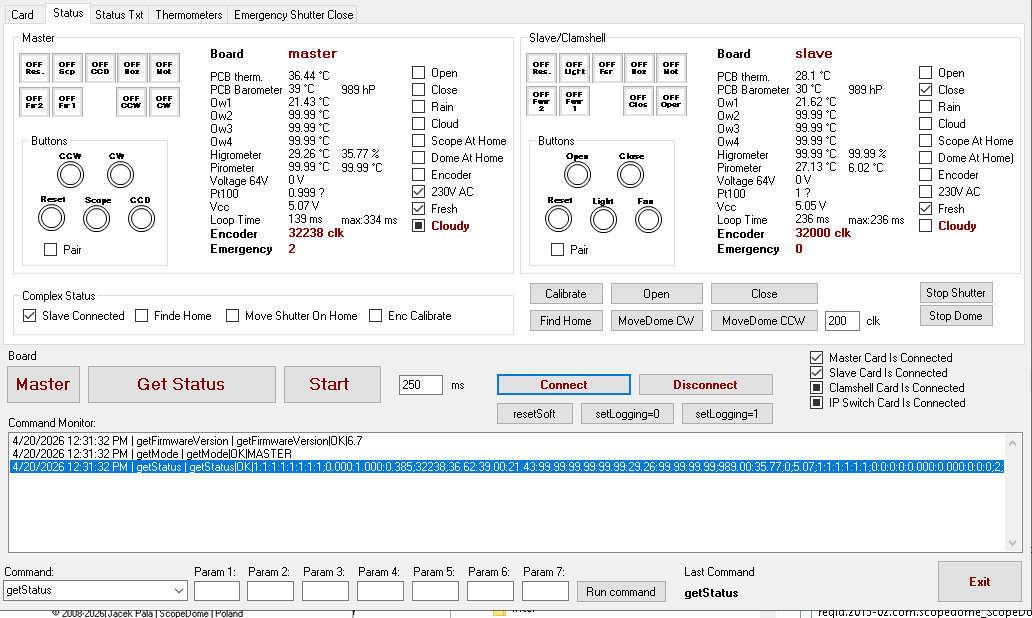
Capture status


No way to open and use my Telescope at the moment. 

Any idea of what’s going on?

Thanks

Eric


Cytat
(@bill110366)
Trusted Member
Połączone: 2 lata temu
Wpisy: 38
Rozpoczynający temat  

I update myself::

I just saw on the Test App, that my Slave board is not showing any power? (230V AC is unchecked) ?

is that normal?


OdpowiedzCytat
(@bill110366)
Trusted Member
Połączone: 2 lata temu
Wpisy: 38
Rozpoczynający temat  

Second update:

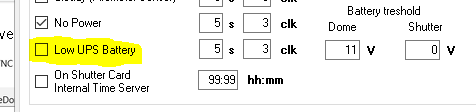
I unboxed the „Low UPS Battery” in the „Shutter events”. 

I tested the opening of the Shutter, and it works well, all the way to open position now.


I checked on the Main board display, it says UPS 0.0V (Means no power detected from the UPS to the Main board)

I checked the UPS: Fully charged (My main computer is running all the time connected only on the UPS).

When I turn the direct Grid connection to Off, the main board keeps running normally, visibly connected to the UPS (display ON). But I cannot command any dome rotation. I still can command an shutter opening, but of course it will still stop and close after a few degrees.

When I switch the direct Grid connection back to On, Dome rotation is working normally again, the shutter as well, still with its problem after a few degrees.

The UPS Voltage remains at 0V all the time (connected to the main Grid on not).

So to summarize: It looks like there is an issue by detecting the power (Volts at 0) from my UPS.

The UPS is fully charged (Permanently connected to the main Grid), and my main PC is running all the time connected to the UPS. The UPS has a Display showing full Battery level.

The shutter problem appeared after having updated the driver to 5.5.30

in the „About” page, I still have 5.5.27 shown.


Is this helping You understanding the problem?

Regards

Eric


OdpowiedzCytat
(@admin)
Członek Admin
Połączone: 2 lata temu
Wpisy: 77
 

Probably you do not uninstall old driver befor install new version.


Opublikowane przez: @bill110366

Hello,


I sent an Support ticket, but no answer so far.

Driver updated to 5.5.30 (reinstalled twice)

All functions ok, except Shutter opening: The shutter moves about 15 to 30 degrées, and then closes again.

Weather station: No difference by selecting either AAG SOLO, AAG CLOUDWATCHER, SCOPE DOME CLOUDSENSOR or NONE 

A point of interrest: in the „About” Windows, the Driver seams still to be 5.5.27. Is this normal?

Capture.PNG dome version


No way to open and use my Telescope at the moment. 

Any idea of what’s going on?

Thanks

Eric


OdpowiedzCytat
(@admin)
Członek Admin
Połączone: 2 lata temu
Wpisy: 77
 

Yes.

Opublikowane przez: @bill110366

I update myself::

I just saw on the Test App, that my Slave board is not showing any power? (230V AC is unchecked) ?

is that normal?


OdpowiedzCytat
(@admin)
Członek Admin
Połączone: 2 lata temu
Wpisy: 77
 

To detect (meashure) UPS battery voltage you must connect UPS battery output to 64V input on card. 

This feature works only if you physically connect (with a cable) the UPS battery output to the input on the card.


Opublikowane przez: @bill110366

Second update:

I unboxed the „Low UPS Battery” in the „Shutter events”. 

I tested the opening of the Shutter, and it works well, all the way to open position now.


I checked on the Main board display, it says UPS 0.0V (Means no power detected from the UPS to the Main board)

I checked the UPS: Fully charged (My main computer is running all the time connected only on the UPS).

When I turn the direct Grid connection to Off, the main board keeps running normally, visibly connected to the UPS (display ON). But I cannot command any dome rotation. I still can command an shutter opening, but of course it will still stop and close after a few degrees.

When I switch the direct Grid connection back to On, Dome rotation is working normally again, the shutter as well, still with its problem after a few degrees.

The UPS Voltage remains at 0V all the time (connected to the main Grid on not).

So to summarize: It looks like there is an issue by detecting the power (Volts at 0) from my UPS.

The UPS is fully charged (Permanently connected to the main Grid), and my main PC is running all the time connected to the UPS. The UPS has a Display showing full Battery level.

The shutter problem appeared after having updated the driver to 5.5.30

in the „About” page, I still have 5.5.27 shown.


Is this helping You understanding the problem?

Regards

Eric


OdpowiedzCytat
(@bill110366)
Trusted Member
Połączone: 2 lata temu
Wpisy: 38
Rozpoczynający temat  

I have this on my driver page:

Capture driver 5.5.30


And this on my about page:

Capture About


– What is this ScopeDome Driver LS for? is it required? (I have an Arduino board)

– Why is my shutter fully opening when deselecting the Low UPS battery ? (when this box is checked, my shutter is having the problem. When unchecked, the shutter opens normally)

For info, my UPS is connected to the the Main power socket number 1 of the Control box

Capture low batt


OdpowiedzCytat
(@admin)
Członek Admin
Połączone: 2 lata temu
Wpisy: 77
 

@bill110366 

Please unistall Driver LS and ScopeDome arduino driver first. Next install ScopeDome driver ver. 5.5.30. 
I do not know why your shutter full opening when you deselect Low UPS battery oprion in Config window. 
Probably the best will be if I help you via Online Serice session. 


OdpowiedzCytat
(@bill110366)
Trusted Member
Połączone: 2 lata temu
Wpisy: 38
Rozpoczynający temat  

I just realized having also issue with the Dome rotation:

i have several time a message saying „Dome rotation is too slow”

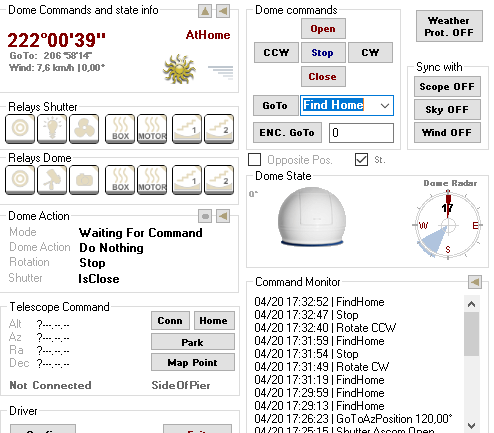
the „Find home” is not working properly: sometimes it finds the home position (205° in my case) but several times it stop at 222°, or at a position which is completely wrong: for ex 140°, but is about 200°… 

When „Find home” works (Means the Dome stops at 205°, and I have a green „At Park” and a red „At home” message), after a minute or two, the Dome indicates 222°, and only the red message „At home”.

But I did not touch anything since the last successfull „Find home”…

Capture Find home


OdpowiedzCytat
(@admin)
Członek Admin
Połączone: 2 lata temu
Wpisy: 77
 

I can not help you via emails. 
Please shedule online service session with me. 
Please read topic on Q&A on this forum.


OdpowiedzCytat
(@bill110366)
Trusted Member
Połączone: 2 lata temu
Wpisy: 38
Rozpoczynający temat  

Ok, I uninstalled both driver, and reinstalled again 5.5.30.

I have again both Driver (teh LS, and the 5.5.30.

In the „about”, I still have 5.5.27.

I still have the shutter issue

I still have the find home issue

I still have the message „the dome rotates too slow”

I have a „bad link message as well now…..

I thinks this driver is corrupted 


OdpowiedzCytat
Udostępnij: