

We are at a loss!
Problem:
In the driver software ‘ScopeDome Arduino Dome v10f13’:
The shutter can no longer be controlled on the ‘Shutters’ tab.
The lighting can no longer be switched on in the ‘Main’ tab.
The button in the ‘Relay Shutter’ frame changes status (dark red colour), but the light does not come on.
On the shutter box:
The ‘Open’, “Close” and ‘Light’ buttons on the shutter box itself also have no effect.
Status:
On the shutter box:
Only the ‘Encoder’ LED lights up red.
The shutter can be opened and closed using the yellow ‘Emergency Buttons’ “Open” and ‘Close’.
In the software:
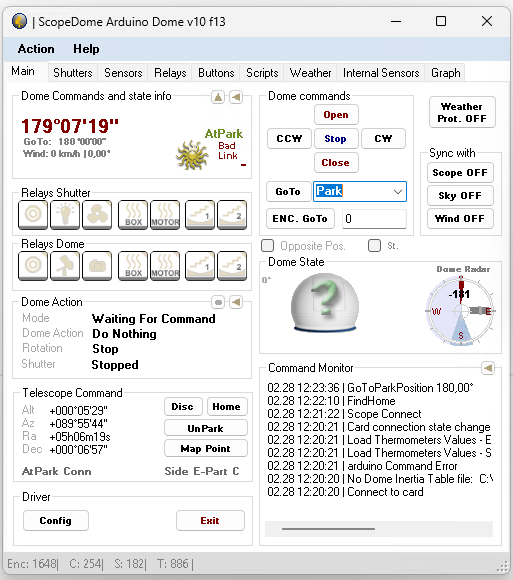
Red ‘Bad Link’ note on the “Main” tab in the ‘Dome Commands and state info’ frame.
Green question mark on the ‘Main’ tab in the ‘Dome State’ frame on the dome sketch.
Arduino_Error_Log.txt:
26.02.2026 12:25:34 | slave=setTime=1772105134 | slave|ERROR|Bluetooth not connected | adruino_command_error
26.02.2026 12:25:34 | slave=getBootloaderVersion | slave|ERROR|Bluetooth not connected | adruino_command_error
26.02.2026 12:25:37 | slave=getFirmwareVersion | slave|ERROR|Bluetooth not connected | adruino_command_error
26.02.2026 13:00:31 | moveShutter=OPEN:50000:3000 | moveShutter|ERROR|Bluetooth not connected | adruino_command_error
26.02.2026 13:03:12 | moveShutter=OPEN:50000:3000 | moveShutter|ERROR|Bluetooth not connected | adruino_command_error
26.02.2026 13:04:59 | moveShutter=OPEN:50000:3000 | moveShutter|ERROR|Bluetooth not connected | adruino_command_error
26.02.2026 13:09:52 | moveShutter=OPEN:50000:3000 | moveShutter|ERROR|Bluetooth not connected | adruino_command_error
26.02.2026 13:12:48 | moveShutter=OPEN:50000:3000 | moveShutter|ERROR|Bluetooth not connected | adruino_command_error
26.02.2026 13:14:28 | Bad status format | board: master – section: relays
26.02.2026 13:14:28 | Bad status format | board: master – section: relays
26.02.2026 15:45:57 | getStatus | IP_command_error | IP_command_error
LEDs on the circuit boards:
Shutter box:
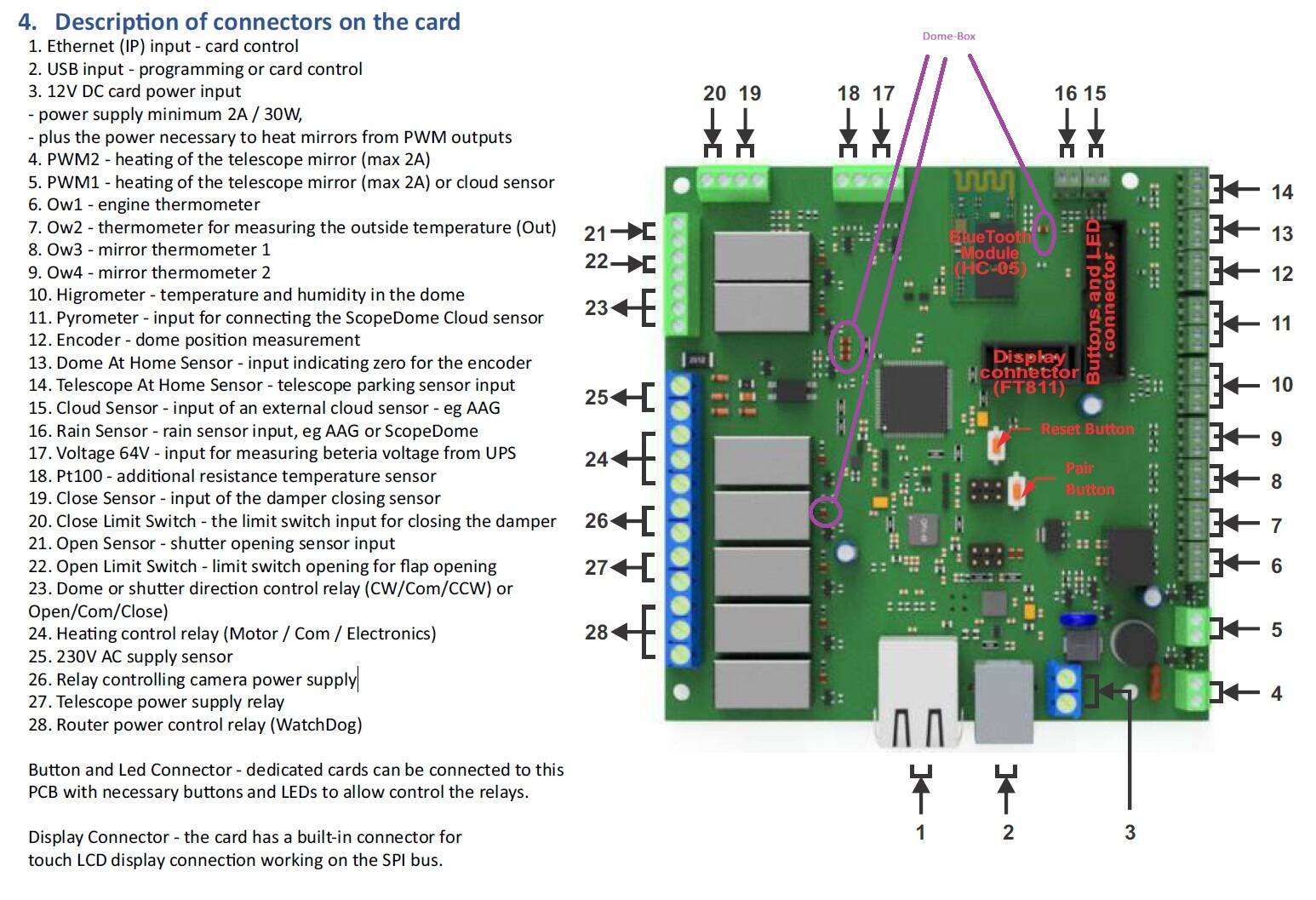
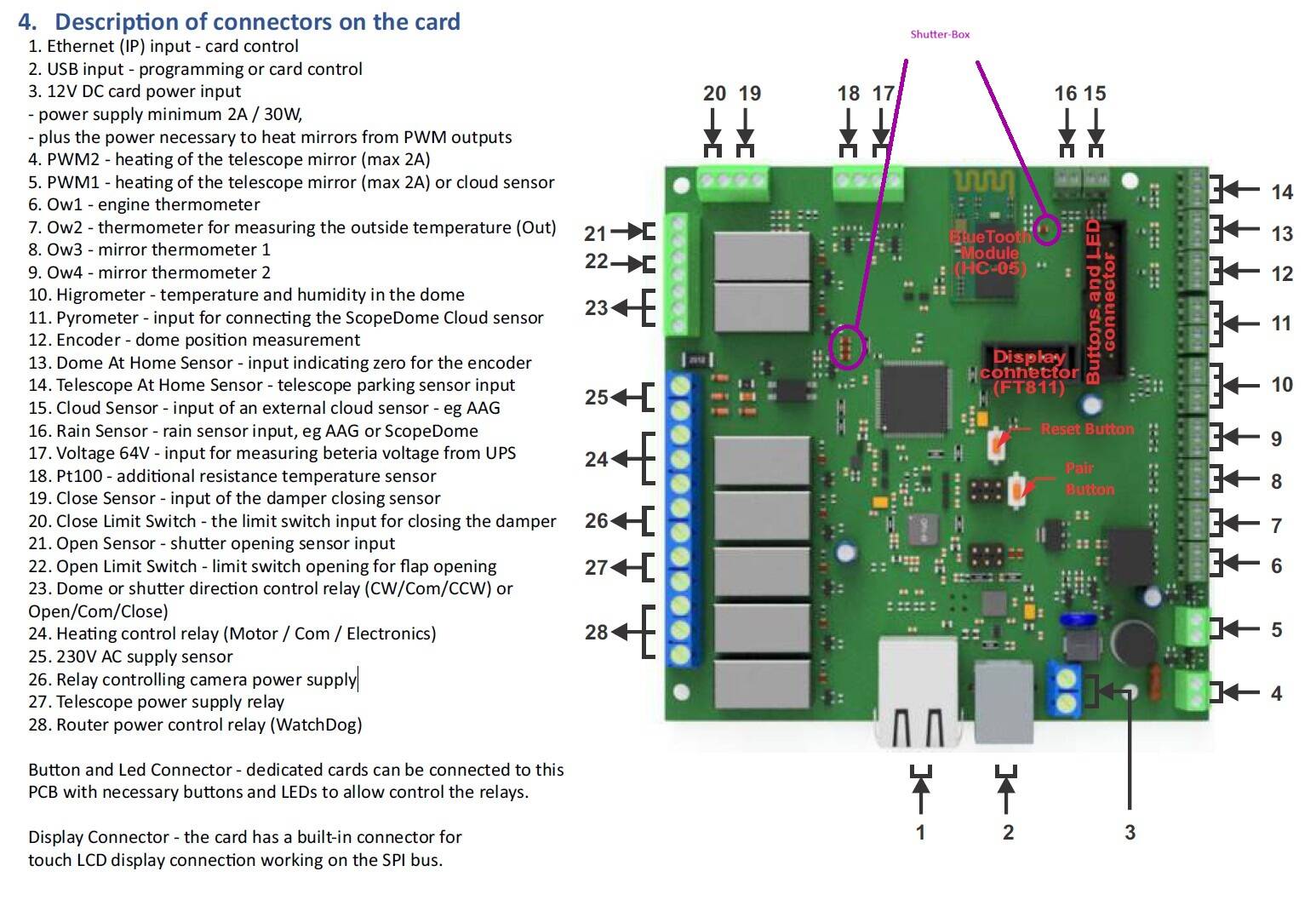
1) On the Bluetooth module: fast continuous flashing in blue.
2) To the right below the ‘Dome or shutter direction control relay’
(No. 23 in the circuit board description in ScopeDome_Arduino_Card_Manual_EN_PlugAnd_Play_2.0.pdf):
– Permanently lit LED in red.
– Below it, slowly flashing LED in blue; after flashing approximately 11 times ,
– a green LED flashes once between the two.
Dome box:
1) On the Bluetooth module: alternating fast and slow flashing in blue.
2) To the right below the ‘Dome or shutter direction control relay’
(No. 23 in the circuit board description in ScopeDome_Arduino_Card_Manual_EN_PlugAnd_Play_2.0.pdf):
LED continuously lit in blue.
3) To the right of the ‘Relay controlling camera power supply’ (No. 26 in the description):
LED continuously lit in red.
The dome is working without any problems.
Attempted solutions:
Switching all components off and on again was unsuccessful.
Bluetooth pairing by simultaneously pressing the Open + Close + Fan buttons (shutter box) and CCW + CW + CCD buttons (dome box) was unsuccessful!
Background:
In the log, we also find the entry ‘Bluetooth not connected’ from months ago. But the problem described has only occurred now.
In October, we updated the firmware and connected a new computer. After that, all components continued to function.
Since then, no further changes have been made to our knowledge.
The weather was cold and often wet for many weeks. Dew often formed inside the dome.
Please note the attachments regarding the flashing LEDs on the circuit boards!

Please connect the USB cable to the Shutter part of the card and try to program it from scratch:
1. Reinstall the firmware
2. Connect to the card using the Arduino_Test_App.exe program (click Connect button). First, select the COM port number of the card and press the Save Settings button.
3. Program the card as Slave. Card Preset->As Slave
Good afternoon!
Thank you very much for your quick response!
We will implement your proposed solution today.
Two questions already:
1) How can we ensure that our previous settings are retained after the new firmware update?
2) Do you have any idea what kind of error this is and what might have caused it? We would like to avoid this in the future.
Best regards,
Andreas and Roland
ad 1. firmware apdate do not change card settings
ad 2. no
Hello Admin!
We were able to successfully reinstall the firmware for the dome box first and then for the shutter box.
Unfortunately, however, it was not possible to connect to the shutter box and set its card „As Slave” using Arduino_Test_App.exe.
The program reported a timeout and that no connection to the card could be established. In contrast, this was possible with the dome box card.
Nothing has changed in terms of the overall error pattern: green question mark, bad link message, no function for the light and camera switches, no function for the “Open” and “Close” buttons on the shutter box, no Bluetooth pairing. It was also not possible to establish a Bluetooth connection using the pair button on the circuit board. The reset button on the circuit board also had no effect.
It might be helpful to know what this means:
the RGB LED is permanently lit red, flashing blue, and briefly lighting up green every 10 times.
In contrast, this LED does not light up at all on the dome box circuit board!
We are completely at a loss! We really hope you can help us!
Try disconnect all sensor from shutter card. If it not help you will ned send card for repair to Poland.
We’d like to share the results with you:
We unplugged a few cables from the Shutterbox, and the red LED went out. Then, using the test app, we discovered that the Shutterbox and the Domebox both had the same IP address assigned to them. We can’t figure out how that happened. We corrected this. After that, the two Bluetooth LEDs started flashing in sync.
Now the shutter could be controlled again via the software. And the green question mark had disappeared.
It’s impossible to say for certain what exactly caused the issue—the cables or the IP address.
But without your help, we wouldn’t have known what to do next. Thanks again!
How I can help You?
Hello, Admin. Thanks for checking in!
Unfortunately, our hopes of having solved the problem have been dashed!
After a power outage, the problem returned.
So we tried again to configure the Shutter Box and Dome Box as slave and master using arduiono_test_app.exe, and then made another attempt to establish a Bluetooth connection.
We disconnected the cables from the shutter box again. The red LED then went out. We were also able to connect to both boxes via USB. But we couldn’t establish a Bluetooth connection.
Our other issues are:
1) We don’t fully understand how to use arduiono_test_app.exe. Is there any documentation available?
2) We’re unsure exactly how the key combination should be pressed to initiate Bluetooth pairing. On both boxes at the same time? How long should we hold it down?
Best regards, Andreas and Roland
Please contact with me via email for remote service session. Price will be 50 Eu/h for my work with you.
How to schedule a online (internet) service session? – Q&A – Scopedome forum